Lab
3
Positioning continued
Box Model
All HTML elements can be considered as boxes. In CSS, the term "box model" is used when talking about design and layout.
The CSS box model is essentially a box that wraps around every HTML element. It consists of: margins, borders, padding, and the actual content.
The image below illustrates the box model:
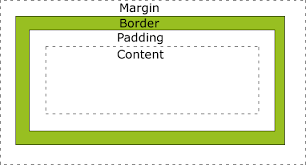
Here is the box model visualized dimensionally
Here is an interactive box model
Layout/ Display
Every HTML element has a default display value depending on what type of element it is. The default display value for most elements is block or inline.
Block A block-level element always starts on a new line and takes up the full width available (stretches out to the left and right as far as it can).
div is an important block-level element
Inline An inline element does not start on a new line and only takes up as much width as necessary.
span is an important block-level element
More on CSS Display Here.
Positioning
The position property specifies the type of positioning method used for an element. There are four different position values:
- static
- relative
- fixed
- absolute